
Plaum AI
How you get here: the floating Plaum AI button — it rides above every tab — or Ask AI for help on the Discover coach mark, or Ask Plaum on the welcome sheet. Requires an account? Yes. Guests are asked to sign up first.
What this is
A conversational food assistant that knows your taste profile and your location. The pitch from onboarding: "Plaum AI knows what you like, so you can ask things like, 'I want to eat out tonight. Where should I go?'"
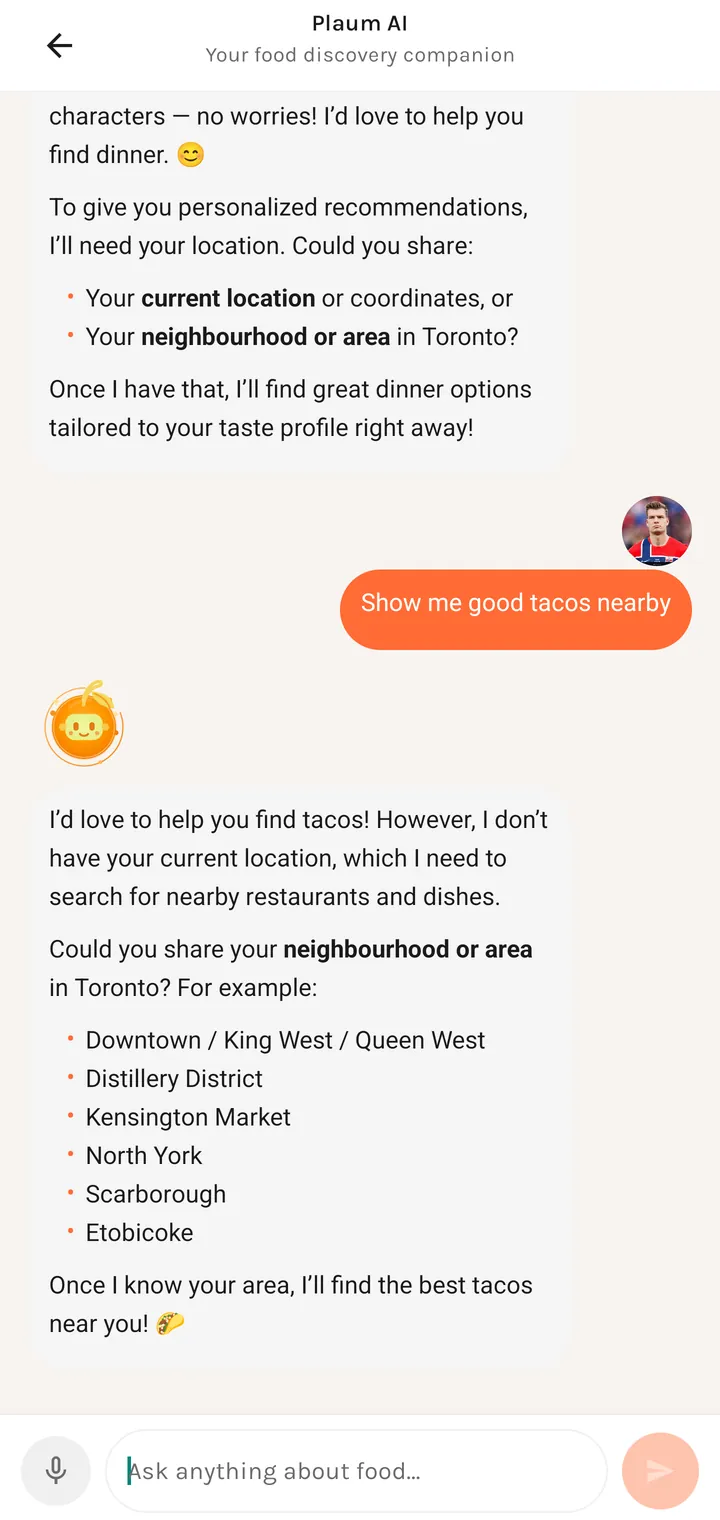
Plaum AI Your food discovery companion
The floating button
A draggable orange mascot that persists across all tabs. You can move it out of the way and it stays where you put it.
- Tap — opens the chat.
- Long press — starts listening immediately (voice input).
Its accessibility label spells both out: "Open Plaum AI food assistant. Long press to listen."
The empty state
What are you craving?
Ask me about restaurants nearby, what to order, or get personalized suggestions. Tap the mic to speak.
What it can actually do
From its own description when asked something vague:
- Discover food and restaurants nearby
- Browse a specific restaurant's menu
- Help place an order
- Make a reservation
It is deliberately scoped to food. Ask it something outside that and it says so and steers back — it will, for instance, decline to process an email address and restate what it's for.
Location
The AI needs a location to answer "nearby" questions and will ask for one rather than guess:
I'd love to help you find tacos! However, I don't have your current location, which I need to search for nearby restaurants and dishes.
Could you share your neighbourhood or area?
You can answer in plain language — a neighbourhood name is enough.
Voice input
The mic button to the left of the input field.
| State | What you see |
|---|---|
| Recording | Listening… |
| While recording | Cancel voice input / Stop recording |
Failure cases each get their own message rather than a generic error:
| Problem | Message |
|---|---|
| Permission not granted | Microphone permission needed — Please allow microphone access to use voice input. |
| Device can't do speech recognition | Voice input unavailable — Speech recognition is not available on this device. |
| Recogniser wouldn't start | Voice input failed — We could not start speech recognition on this device. |
The permission dialog offers a direct jump to Open settings.
The message field
Placeholder: Ask anything about food.... Your avatar appears beside your messages, the
mascot beside the AI's. Replies render as rich markdown — bold, bulleted lists, and
tappable dish and restaurant names that deep-link into the app.
Where you go next
Answers link into Dish detail, Restaurant profile, and ordering, so a conversation can end in an actual order.