
The Plaum camera
How you get here: the + button in the centre of the tab bar, from any tab. Also from the Open Camera button on the Dish Cards empty state. Requires an account? Yes — guests get "You'll need an account to capture and share dishes."
What this is
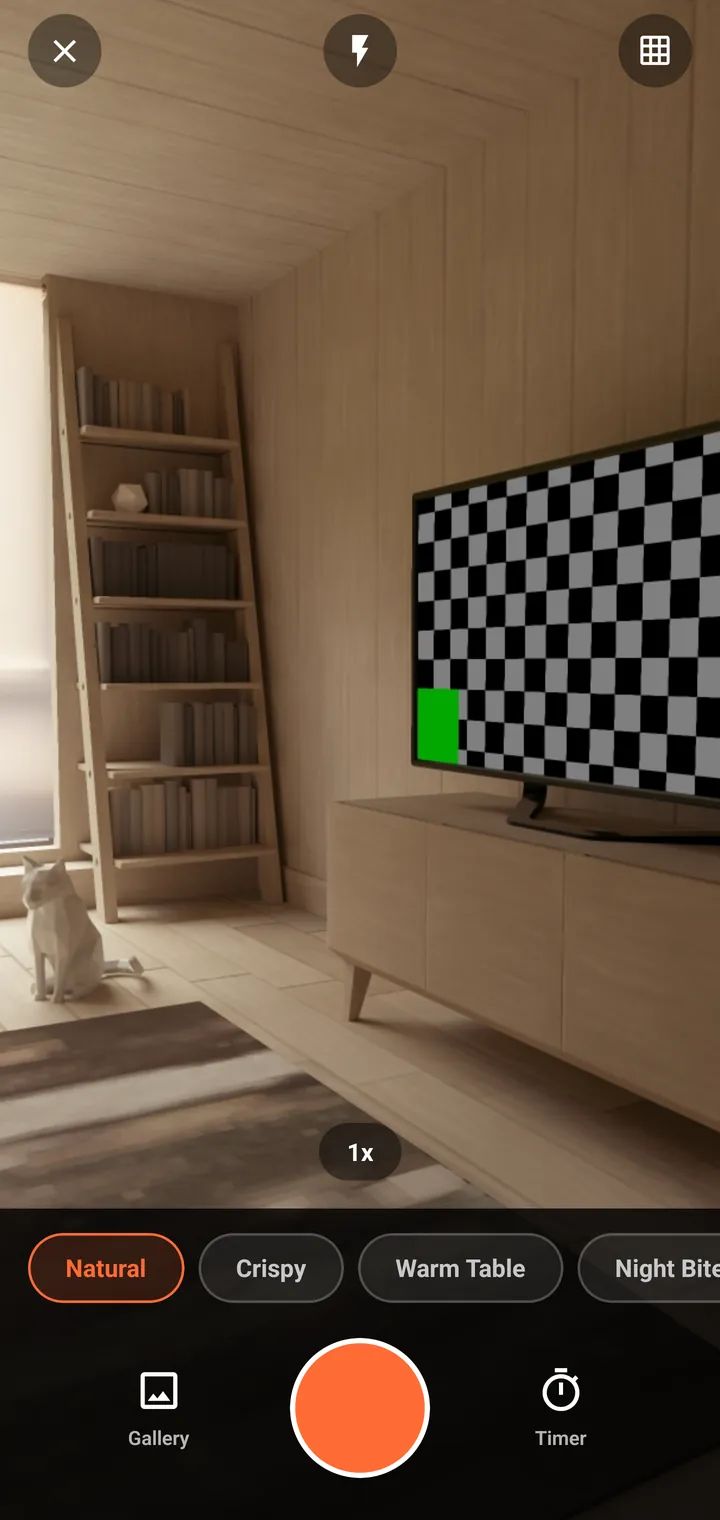
A purpose-built food camera. It is registered at the root of the navigator, not inside a tab, so it opens on top of wherever you are and closing it returns you there.
First use — permission
Camera access required Plaum uses your camera to capture food photos for Dish Cards and posts. [ Continue ]
Continue triggers the OS prompt. The app explains why before asking, rather than firing the system dialog cold.
The controls
| Control | Position | What it does |
|---|---|---|
| Close | Top-left | Exits back to where you were. |
| Flash | Top-centre | Off / on / auto. |
| Grid | Top-right | Composition guides. |
| Zoom | Above the filters | Tap to cycle, pinch on the feed. |
| Gallery | Bottom-left | Pick an existing photo instead. |
| Shutter | Bottom-centre | Takes the shot. |
| Timer | Bottom-right | Delayed capture. |
The filter strip
Four presets, applied live to the viewfinder:
| Preset | What it's for |
|---|---|
| Natural | No grade. |
| Crispy | A contrast and saturation push — texture on fried and crusted food. |
| Warm Table | Corrects the warm cast of restaurant tungsten lighting. |
| Night Bite | Brightens for dim rooms. |
There's a subtlety here worth knowing, because it explains why the viewfinder doesn't match the result exactly. The live preview can only approximate each grade with a flat tint, while the real grade is a contrast/saturation/white-balance matrix. The hints are kept faint and, critically, are pointed in the same direction as the output: Warm Table corrects a warm cast so its hint is faintly cool, not orange; Night Bite brightens so it must never darken the feed. The Enhance screen renders the exact matrix, so that's where you judge the final look.
Where you go next
Taking a photo moves you to Enhance, then Dish Cards.