
Rating an order
Deep link: plaum://order/:orderId/review
How you get here: after an order completes, from Order status or
Orders; also from a push notification.
Requires an account? Yes. Guests get "You'll need an account to leave reviews."
What this is
Rating, comment, and — importantly — the second chance to tip. Tipping after the meal rather than before is the point of this screen: you've now actually eaten the food.
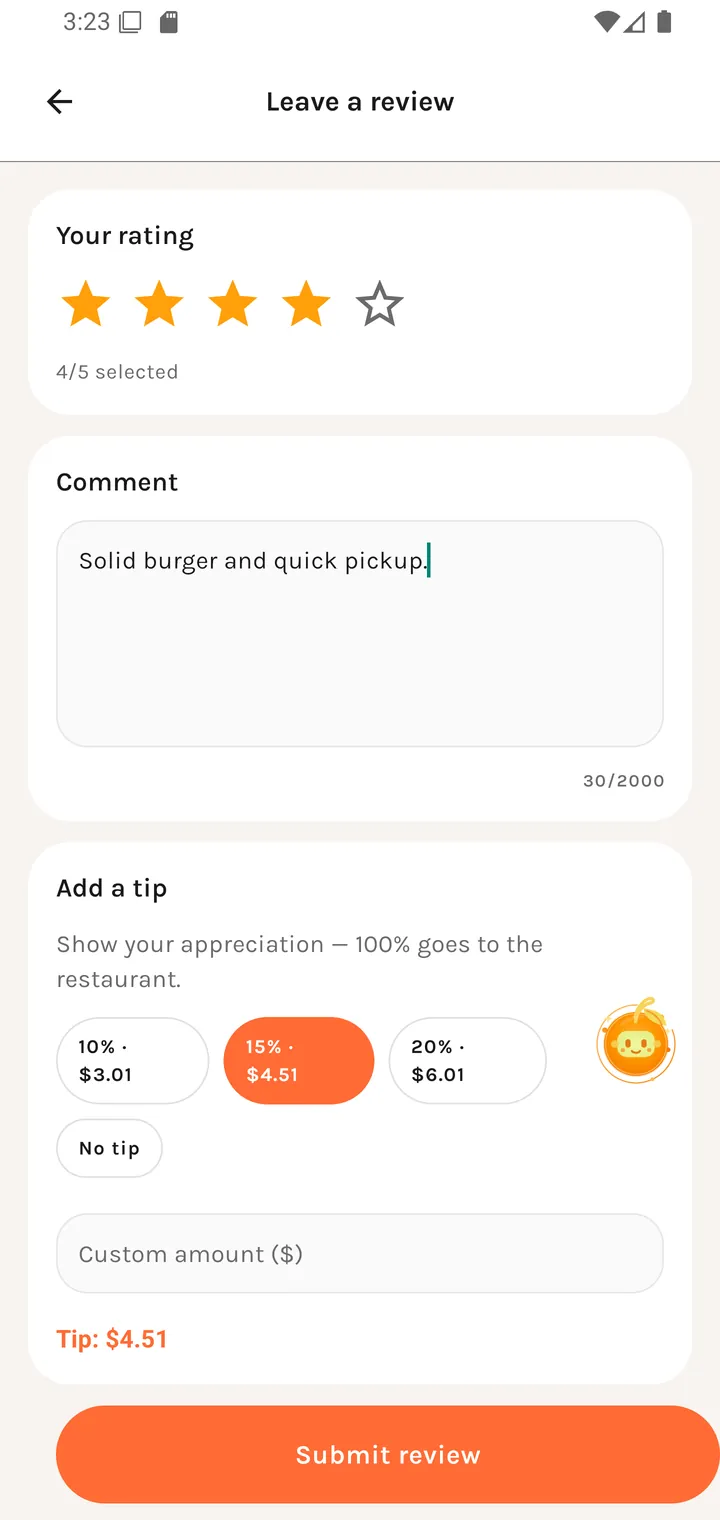
Leave a review
Rating
Your rating Tap a star to rate
Five stars, with the selection echoed underneath as "4/5 selected". Submitting without one is refused:
Please select 1 to 5 stars before submitting.
Comment
Comment
What stood out?
Optional, up to 2000 characters with a live counter. The placeholder asks a specific question rather than repeating the label.
Tipping afterwards
Add a tip Show your appreciation — 100% goes to the restaurant.
Presets computed from the order total — 10% · $3.01, 15% · $4.51, 20% · $6.01 — plus Custom amount ($) and No tip. The running value shows underneath as Tip: $n.
If you already tipped
Tip already added You already tipped $n at checkout.
You can't accidentally tip twice.
If there's no saved card
This is the fiddly case, and the app handles it without losing your review:
We could not charge that tip with a saved card yet. You can save one and try again, but leaving a tip is optional.
Save a card for future tips Optional: save a card once so future tips can go through without re-entering your details.
with Save card and Retry tip. Note the repeated reassurance that tipping is optional — you are never blocked from submitting the review.
| State | Message |
|---|---|
| Charging | Charging tip... |
| Success | Tip charged successfully. Thank you! |
| Card setup failed | Could not open card setup. Please try again. |
| Tip failed | Your review was submitted, but the tip could not be charged. |
That last one matters: the review still went through. The two are decoupled.
Submitting
Submit review → Submitting... → "Thanks! Your feedback has been shared." On failure: "Could not submit review. Please try again."
Once done, the order is marked Reviewed.
Where you go next
Restaurant reviews is where your review ends up · Payment methods to save a card in advance