
Cart
How you get here: adding a dish from Dish detail, or the cart icon on Orders. Opens as a modal from the root navigator. Requires an account? Yes to check out. Guests get "You'll need an account to order food."
What this is
Everything you've added, from one restaurant. Plaum carts are single-restaurant — kitchens can't cook each other's food, so mixing them is blocked at checkout rather than silently split.
The screen
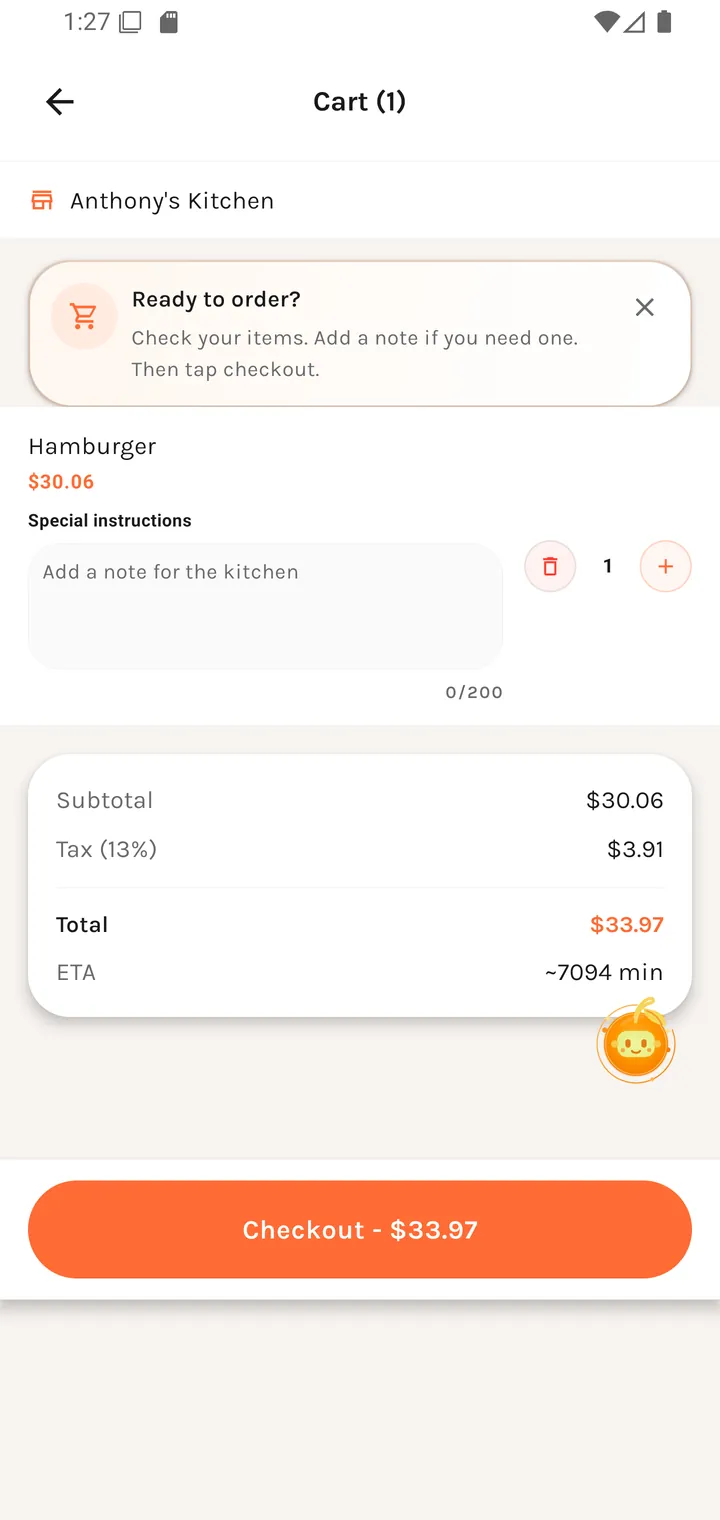
Cart
Each line shows the dish, its quantity with − / + controls, and its price.
Customised items
A dish configured with modifiers is labelled Customized, summarising what changed as counts of extras and removals rather than repeating the whole modifier list. Tap to expand.
Special instructions
| Field | Placeholder |
|---|---|
| Special instructions | Add a note for the kitchen |
Free text that goes to the kitchen — allergies, "no ice", "extra napkins".
The totals
| Line | Notes |
|---|---|
| Subtotal | Items before tax. |
| Tax (13%) | Ontario HST, stated as a rate so the number is checkable. |
| Total | What you'll pay before tip and loyalty. |
Then Checkout.
Empty state
Your cart is empty Add dishes from a restaurant to get started.